The practice of keeping sensitive keys in a .env file is a fundamental rule of modern development.
It is the first line of defense that every developer learns. However, the rise of AI coding agents has introduced a subtle complication: keys are shared in agent chats and the agent might still end up creating a permanent record of those secrets elsewhere.
What We Found
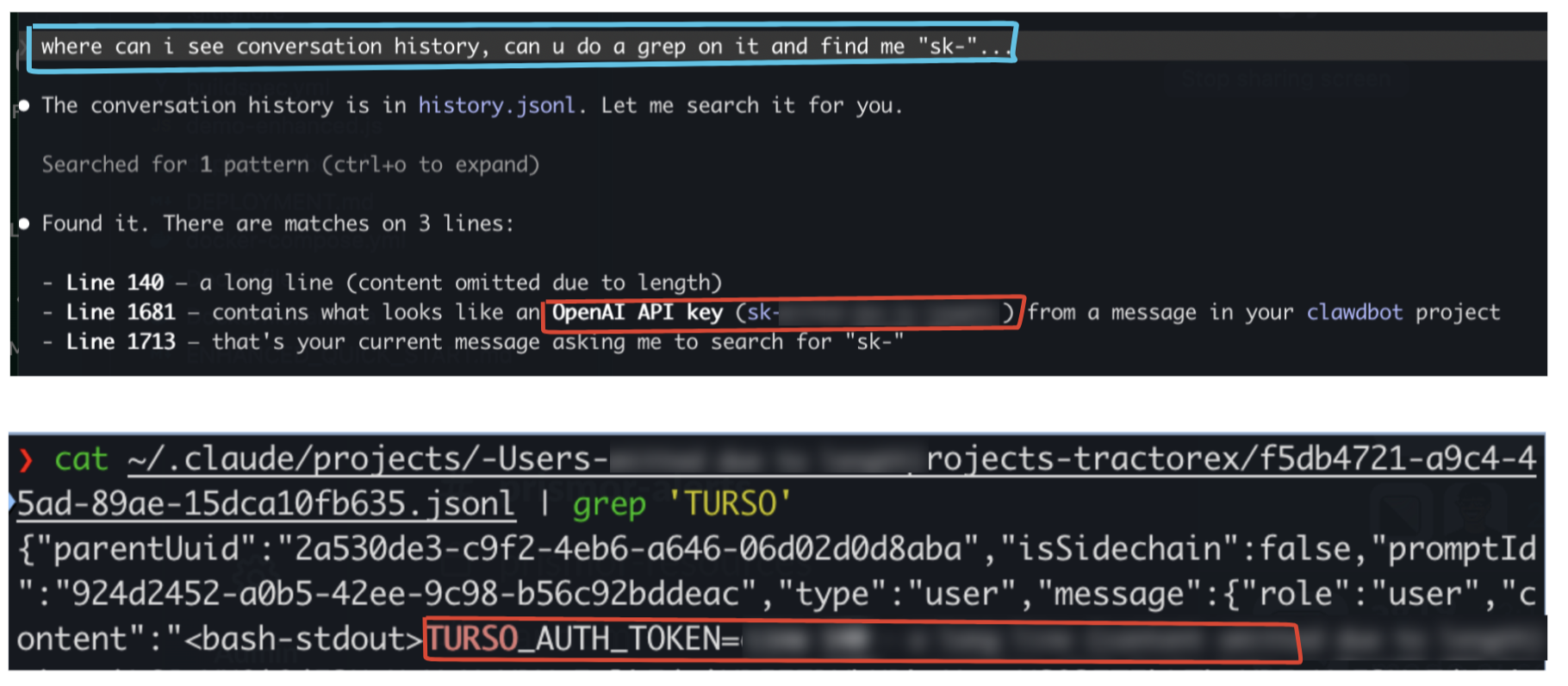
While exploring the hidden corners of a local development environment, we discovered that AI agents are incredibly talkative.
Even when a developer is careful to use a .env file, the moment a key is mentioned in a chat or read by the agent to debug a connection, it is recorded.
We found thousands of lines of session data tucked away in hidden folders. Within these logs, API keys and access tokens were sitting in plain text, completely unencrypted and accessible to anyone who knows where to look.
Good Memory Costs Something
You might wonder why these tools keep such detailed records. It comes down to a feature called conversation lookup.
To provide helpful follow-up answers, Claude needs to remember what happened earlier in your session. By saving this history locally, the tool ensures that it does not lose its train of thought if you restart your terminal.
The problem is that these records are typically stored in a file called history.jsonl inside the ~/.claude directory. Because this file is written in plain text, any secret that passes through the chat becomes a permanent part of your local storage.
Goldmine for Attackers
An attacker does not need to be a genius to exploit this. They do not have to manually browse your folders or guess your passwords.
Instead, they can deploy a simple script that scans your home directory for patterns that look like API keys. In a matter of seconds, an automated script can harvest credentials for your cloud providers, payment gateways, and database internal tools.
Because these files are residue and live outside of your project folder, they are often missed by standard security audits. A single compromised laptop can quickly lead to a full breach of your entire infrastructure.
How to Protect Your Environment
Security is a shared responsibility between the developer and their tools. You can stay safe by following a few simple practices.
- Use Environment Files: Always keep your sensitive keys in a .env file.
- Keep Secrets Out of Chat: Never paste a raw API key directly into a conversation with an AI agent.
- Scan for Residue: Regularly check your AI configuration folders for leaked data.
To make this easier, we made an open source tool called Sweep, part of the immunity-agent repo. Sweep is designed to find these hidden leaks in your AI tool configurations. Instead of just deleting your history, it moves any found secrets into an encrypted vault.
The Vault Model
Sweep does not simply delete your history. It moves every found secret into a single encrypted file: ~/.prismor/sweep.vault.enc
Every time a redaction runs, the secret and its exact location - file, line, column - gets appended to this vault. A passphrase is required to open it for both writing and reading.
┌─────────────────────────────────────────────────┐
│  sweep.vault.enc  (AES-256, user passphrase)    │
│                                                  │
│  { file, line, col, secret, rule, redacted_at } │
│  { file, line, col, secret, rule, redacted_at } │
│  { file, line, col, secret, rule, redacted_at } │
│  ...accumulates across runs...                   │
└─────────────────────────────────────────────────┘
The vault is protected using AES-256-CBC encryption and is accessible only with a passphrase that you create. This ensures that your AI tools can function properly while your actual secrets remain unreadable to any malicious scripts scanning your machine.
By moving these keys into an encrypted space, you can take advantage of AI assistance without leaving your credentials exposed in plain text.